CPR Certification: What It Is and Why It Matters
Imagine you are at a local grocery store, a high school basketball game, or a family dinner. Suddenly, someone nearby collapses. They aren’t breathing, and they don’t have a pulse. At that moment, the clock starts ticking. Every second that passes without intervention decreases their chance of survival. Would you know what to do?
This is where CPR certification moves from being a “good idea” to an “essential life skill.” While many people think CPR is only for doctors or nurses, the reality is that most cardiac arrests happen in public or at home. The person most likely to save a life isn’t a surgeon in an operating room—it’s a bystander with the right training.
In this guide, we’ll dive deep into what CPR certification actually entails, why it is so critical for everyone (not just healthcare pros), and how you can take the first step toward becoming a neighborhood hero.
What Exactly Is CPR Certification?
CPR certification is a formal credential that proves you have undergone professional training in Cardiopulmonary Resuscitation. It isn’t just about reading a book or watching a video; it is a comprehensive educational process that combines theory with hands-on practice.
When you earn a certification, it means you have demonstrated to a certified instructor that you understand the mechanics of the human heart and lungs. You’ve shown you can perform high-quality chest compressions and provide rescue breaths according to current medical standards, such as those set by the American Heart Association (AHA) or the Red Cross.
A typical certification covers:
- Recognizing the signs of sudden cardiac arrest.
- How to call for emergency services effectively.
- The proper depth and rate of chest compressions.
- The use of an Automated External Defibrillator (AED).
- How to assist a choking victim.
Most certifications are valid for two years. This is because life-saving skills are “perishable.” Without practice, your technique can fade, and medical guidelines are updated regularly as we learn more about how to save lives more effectively.
Why Is CPR Certification So Important for the General Public?
You might think, “I’ll just call 911.” While calling 911 is the first step, emergency medical services (EMS) take time to arrive—often between 8 to 12 minutes. Brain damage can begin in as little as 4 minutes without oxygen. CPR acts as a manual pump, keeping oxygenated blood flowing to the brain until professionals arrive.
Here are a few reasons why it matters for everyone:
- Immediate Action: You become the bridge between the collapse and the arrival of the ambulance.
- Confidence Over Panic: In an emergency, adrenaline spikes. Without training, most people freeze. Certification gives you a “mental script” to follow, allowing you to act decisively.
- Protecting Loved Ones: Statistically, 70% of out-of-hospital cardiac arrests happen at home. Your training is most likely to be used on a family member or friend.
- Empowering Communities: A community where more people are certified is a safer community. It creates a network of safety in parks, offices, and schools.
What Happens During a CPR Training Class?
If you’ve never been to a CPR class, you might feel a bit nervous about what to expect. There’s no need to worry. CPR classes are designed to be supportive, engaging, and highly practical. They are built for people of all backgrounds and physical abilities.
When you walk into a class at CPR Classes Near Me, you can expect the following:
- Expert Instruction: You’ll be guided by an experienced instructor who has seen these scenarios in real life. They explain the “why” behind every movement.
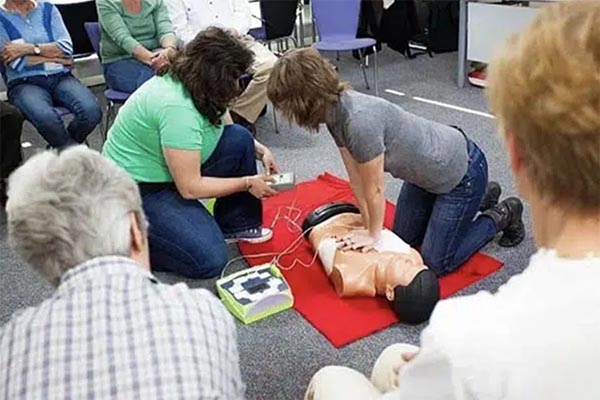
- Hands-On Practice: You won’t just sit in a chair. You’ll use medical-grade manikins to practice compressions. This helps you get a feel for how much pressure is required.
- AED Demonstration: You will learn how to use an Automated External Defibrillator. These machines are very easy to use—they actually talk to you—but practicing with a trainer model builds the confidence to use one in a real emergency.
- Skills Testing: At the end of the session, the instructor will watch you perform the skills you’ve learned. Once you demonstrate proficiency, you receive your certification.
The goal isn’t to make you a doctor; it’s to make you a capable first responder who can keep someone stable until the cavalry arrives.
Is Online CPR Certification Enough?
In the digital age, many people wonder if they can just get certified through a quick online quiz. While online courses can provide great “head knowledge,” they often lack the most important element: the hands-on component.
Performing CPR is a physical task. It requires a specific depth (about 2 inches for adults) and a specific rhythm (100–120 beats per minute). It is very difficult to judge if you are doing this correctly without a manikin that provides feedback or an instructor who can correct your form.
Most employers—especially in healthcare, education, and childcare—require a certification that includes an in-person skills check. At CPR Classes Near Me, we focus on that hands-on experience because we know it’s what actually saves lives when the pressure is on.
Who Should Consider Getting Certified?
The short answer is: everyone. However, for certain groups, CPR certification is either a job requirement or a critical safety necessity.
- Parents and Caregivers: Infants and children require different CPR techniques than adults. Learning these can prevent a tragedy during a choking or drowning incident.
- Teachers and Coaches: Educators are on the front lines. With kids running around and playing sports, the risk of injury or respiratory distress is higher.
- Fitness Professionals: Gyms are high-risk environments for cardiac events due to the physical strain on the heart.
- Workplace Safety Officers: Every office should have at least a few people who know how to use the office AED and perform CPR.
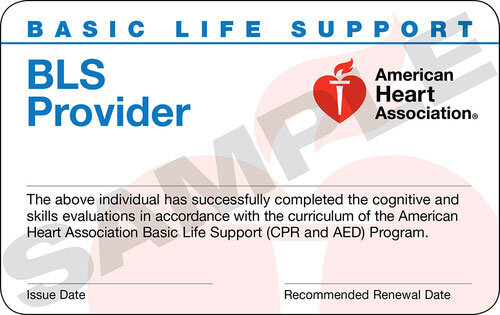
- Healthcare Providers: For nurses, dental assistants, and physical therapists, Basic Life Support (BLS) certification is a standard requirement for employment.
What Is the Difference Between CPR and BLS?
When looking for classes, you might see two different terms: Heartsaver CPR and BLS (Basic Life Support). It’s important to know which one you need.
- Heartsaver CPR/AED: This is designed for the general public—teachers, fitness trainers, and corporate employees. It covers the basics of CPR, AED use, and choking relief for adults, children, and infants.
- BLS (Basic Life Support): This is a more advanced level of training designed for healthcare professionals. It includes everything in the Heartsaver course plus advanced techniques like multi-rescuer coordination and the use of bag-mask devices.
If you aren’t sure which one to take, the team at CPR Classes Near Me can help you determine which course fits your needs or job requirements.
How Does an AED Work With CPR?
You’ve probably seen AED boxes in airports or malls. They are small, portable devices that can literally “reboot” a heart that has an irregular rhythm. CPR and AEDs are a team.
While CPR keeps the blood moving manually, it rarely stops the underlying cause of the cardiac arrest. The AED is the tool that can stop the chaotic electrical activity in the heart (ventricular fibrillation) and allow a normal rhythm to return.
In a certification class, you learn:
- Where to place the electrode pads.
- How to ensure no one is touching the victim when the shock is delivered.
- How to immediately resume CPR after the shock.
Using an AED within the first 3 to 5 minutes of collapse can increase survival rates to as high as 50% to 70%. Without an AED, the chances drop significantly every minute.
How Can You Maintain Your CPR Skills?
As mentioned earlier, CPR certification typically lasts for two years. But why? Studies show that CPR skills begin to decline as early as six months after training. You might forget the exact compression-to-breath ratio or feel hesitant about where to place your hands.
To stay sharp, we recommend:
- Regular Review: Glance at your provider manual or digital resources every few months.
- Watch Refreshers: Look at updated videos on proper technique.
- Recertify Early: Don’t wait for your card to expire. Schedule your renewal class a month or two in advance.
By keeping your certification current, you ensure that if you ever have to use your skills, they will be second nature.
Why Choose a Local Class Over a National Chain?
When you search for “CPR classes,” you’ll find plenty of options. However, there is a distinct advantage to choosing a local provider like CPR Classes Near Me.
- Personalized Attention: Smaller class sizes mean the instructor can spend more time with you, ensuring your technique is perfect.
- Local Instructors: Our instructors are members of your community. They understand local emergency response times and community needs.
- Flexible Scheduling: We know you’re busy. Local providers often offer more frequent classes at times that work for working professionals and busy parents.
- Quick Documentation: Getting your certification card shouldn’t take weeks. We prioritize getting your credentials to you as quickly as possible.
Conclusion
CPR certification is more than just a piece of paper or a digital card. It is an investment in the safety of your family, your coworkers, and your community. It transforms you from a helpless bystander into a capable rescuer. Whether you are a parent wanting to protect your child, a professional meeting a job requirement, or simply a Good Samaritan, the skills you learn in a CPR class are the most valuable skills you will ever own.
The heart is a fragile thing, but with the right training, you have the power to keep it beating. Don’t wait for an emergency to happen before you decide to learn. Be prepared, be confident, and be the difference between a tragedy and a success story.
Ready to gain the skills that save lives? Contact CPR Classes Near Me today to find a local class and get certified!
FAQ Section
How long does a CPR certification class take?
Most in-person CPR and AED classes for the general public take between 2 to 3 hours. If you are taking a professional-level BLS (Basic Life Support) course, it may take 3 to 4 hours. The duration depends on the size of the class and the specific modules being covered (such as adding first aid).
Is the CPR test difficult?
The test is designed to ensure you understand the life-saving basics, not to “trick” you. It consists of a practical skills demonstration where you show the instructor you can perform compressions and use an AED, followed by a simple multiple-choice written exam. Most students find that if they pay attention during the hands-on portion, the test is very manageable.
Do I need to be physically fit to perform CPR?
While CPR is a physical activity, you do not need to be an athlete to do it. The most important factor is technique. Instructors teach you how to use your body weight rather than just your arm strength. If you have physical limitations, instructors can often show you modifications or how to direct others to assist.
Can I be sued for performing CPR?
In the United States, “Good Samaritan” laws protect individuals who provide voluntary assistance in an emergency. As long as you act in good faith and within the scope of your training without expecting compensation, you are generally protected from legal liability.
Does CPR always work?
Unfortunately, CPR is not a guarantee of survival. Its purpose is to buy time for professional medical help and defibrillation to arrive. However, performing CPR significantly increases the victim’s chances of survival compared to doing nothing at all. Even if the outcome isn’t what we hope for, knowing you did everything possible is vital.